
Introduction
When building a Landing Page for a course or digital product, compelling and conversion-optimized content is essential to increasing enrollment rates. However, writing every section—from the Hero to the description, CTA, and visuals—can be time-consuming.
Today, AI can help you create landing page content quickly and efficiently, while still ensuring alignment with your target audience. This guide walks you step by step through using AI to build a complete Landing Page and publishing it on Ourdemy, from ideation to launch.
1. Benefits of Using AI for Landing Page Content
1.1. Faster Writing with Clear Audience Insight
AI helps you:
- Understand your target learners and their pain points
- Translate course features into clear, tangible benefits
- Structure content following a logical learning and decision-making flow
As a result, instead of writing generic or unfocused copy, your landing page stays highly relevant to what learners actually care about.
1.2. Easy Editing and Reusability
- Generate multiple versions for quick comparison
- Adjust tone of voice (friendly, professional, academic, etc.)
- Reuse content structures for future courses
→ Compared to writing from scratch, AI significantly reduces time and effort.
2. What to Prepare Before Writing AI Prompts
Before using AI, defining a few key inputs will help ensure accurate and usable output:
- Landing Page goal
- Course introduction, lead collection, or direct sales
- Example:
- Course name: Moca’s Sweets Land
- Content: A beginner-friendly Japanese sweets course with a cute style
- Goal: Reach 80–100 enrollments in the first month
- Target audience
- Define your learners clearly
- Example: Japanese sweets lovers, aged 20–40, living in cities, enjoy home cooking
- Required page elements
- Course name, benefits, number of lessons, price, images, CTA
Well-prepared inputs allow AI to generate content that can be applied almost immediately.
3. Using AI to Create Landing Page Content
A high-converting Landing Page is not just visually appealing—it must deliver the right message, retain attention, and drive action.
A well-structured page typically includes: a strong Hero section, course description, clear CTAs, and supporting visuals.
Below is a step-by-step guide on how to use AI to generate each section, based on the example course Moca’s Sweets Land.
3.1. Hero Section – Creating the First Impression
The Hero section is the first thing visitors see. It usually includes a headline, subtitle, and hero image. Its goal is to capture attention, inspire interest, and encourage further reading.
Sample AI Prompt:
Please write 5 Hero section variations for the course “Moca’s Sweets Land” for beginners, including:
- A short, conversion-focused headline
- A subtitle describing key course benefits
- Suggestions for illustration style: soft, feminine, related to Japanese sweets
💡 Tip: Generate multiple versions to test and select the strongest option.
3.2. Course Description – Convincing the Reader
This section explains the value, content, and real benefits of the course.
Sample AI Prompt:
Write a landing page description for the course “Moca’s Sweets Land” including:
1. The learner’s main challenges
2. How the course solves those problems
3. Key benefits in 2–3 concise sentences
💡 Tip: Ask AI to generate 2–3 variations and test which performs best.
3.3. CTA – Clear Call to Action
Call to Action (CTA) is critical for improving conversion rates. CTA text should be short, clear, and motivating, often with a sense of urgency.
Sample AI Prompt:
Write 5 engaging CTA phrases for the landing page of “Moca’s Sweets Land”, short and action-oriented.💡 Tip: Place CTAs at both the top and bottom of the page, and test different wording.
3.4. Images – Convey Emotion and Boost Conversions
Images make the landing page more visual, engaging, and inspiring. You can use AI-generated images or suitable stock photos:
- Hero image: Beautiful Japanese sweets on a kitchen table
- Description/benefits: Learners enjoying cooking or baking with family
- Infographics: 3–5 step learning process
💡 Tip: Keep image tone and colors consistent with the Hero section for a cohesive look.
4. Implementing Content on Ourdemy
Once AI-generated content is ready, the next step is to apply it directly in the Ourdemy Page Editor to complete your Landing Page.
Step 1: Create a New Landing Page or Course
- Log in to Ourdemy
- Choose Create New Landing Page or Create New Course
- Open the Page Editor to begin editing
Step 2: Set Up the Hero Section
The Page Editor provides basic fields such as Title and Description for the Hero section.
- Enter the headline into the Title / Header field
- Enter the subtitle into the Description field
- Upload the Hero image (AI-generated or prepared image)
Once added, you will have a complete Hero section that introduces the landing page clearly.

👉 Reference guide: https://ourdemy.com/how-do-i-set-up-a-hero-section-with-background-image-or-video-and-add-a-call-to-action-button/
Step 3: Add Detailed Description Content
- Paste the selected AI-generated description into the content section
- Add supporting images, infographics, or learner visuals for clarity
👉 Detailed guide for adding text and images:

Step 4: Add CTAs (Call to Action)
- Create CTA buttons in the Page Editor
- Use AI-suggested CTA text (e.g. “Enroll Now”, “Start Learning Today”)
CTAs can be placed:
- In the Hero section, and/or
- At the end of the Landing Page
Strategic CTA placement significantly improves conversion rates.
👉 Reference guide: Click here
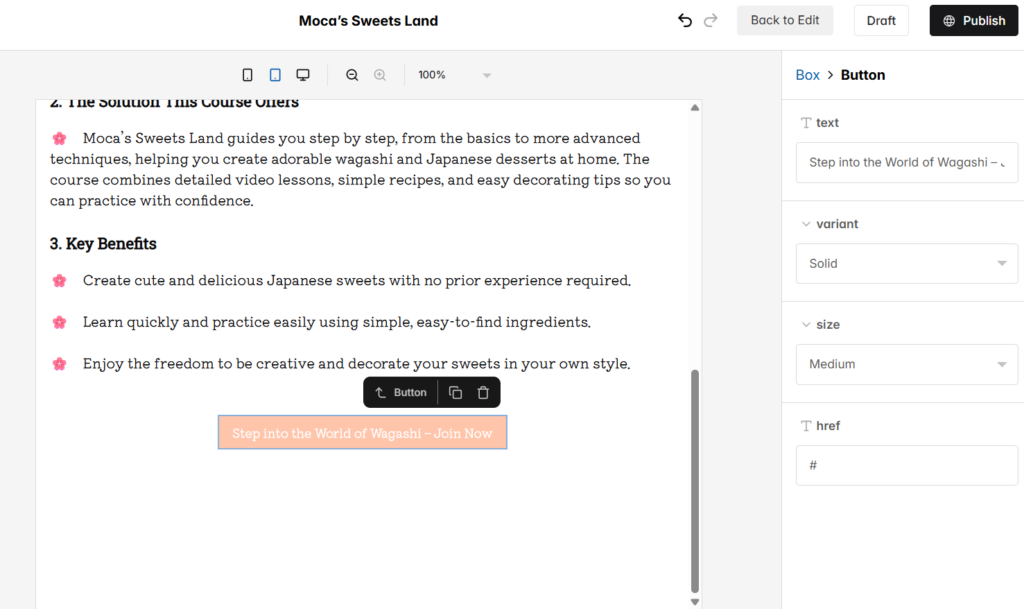
Step 5: Preview and Review
Before publishing, carefully review your Landing Page:
- Preview on desktop, tablet, and mobile
- Check layout balance between text and images
- Ensure CTAs stand out clearly
- Adjust fonts, colors, and spacing for readability
- Test all links and buttons
- Proofread for typos and formatting issues
Once everything looks polished, move to the final step.
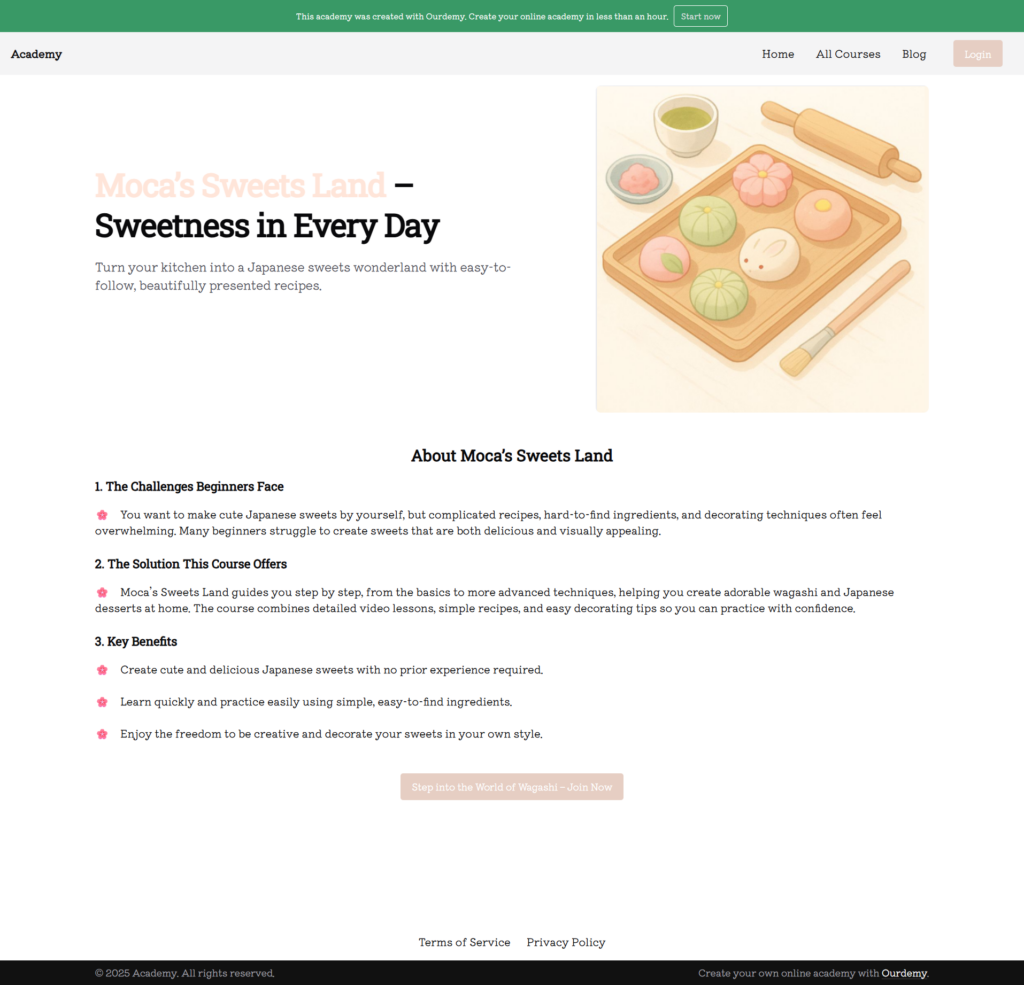
Step 6: Publish the Landing Page
After reviewing all content and layout:
- Click Publish
- Your Landing Page is now live and ready to attract learners
5. Testing and Optimization
If results are not yet optimal:
- Replace the Hero headline or image
- Test different CTAs
- Simplify or refine the description
💡 Tip: AI excels at creating variations—test 2–3 versions of Hero + CTA + description to identify the highest-converting combination.
Conclusion
Using AI to create Landing Page content helps you:
- Save significant content creation time
- Produce conversion-optimized copy quickly
- Experiment easily with multiple headlines, descriptions, and CTAs
- Improve user experience and visual clarity
On Ourdemy, you can apply AI-generated content directly, then fine-tune it to match your brand and course style—allowing you to launch effective, professional Landing Pages with minimal effort.
 English
  日本語
日本語